Updated September 2026
Tools, Workflows, and My Tech Stack
How I actually work: the tools on my machine, the workflows I lean on, and the technologies I reach for when building and operating systems. I run most of this as a single operator, so it is all biased toward reproducibility, automation, and keeping the blast radius small.
Tools
Editor
. Modal, no plugin system, LSP and tree-sitter built in. The theme picker on this site is generated from every one of its bundled themes.
In Terminal
I write most of my code in a terminal.
Yes. I know this is crazy. The thing is, terminal editors have gotten very good, plus most of my editing happens over SSH, not locally. Yes, there are ways to run VS Code over SSH connections, but a lot of the times I might need to only make one or two small edits here and there - not enough to spawn a VS Code server for a client to connect to.
I didn’t always feel this way. I too had trouble exiting vim the first time I
tried it. nvim let me customize the experience, but still
didn’t make me feel productive.
Kakoune and its subject-then-action was a revelation for me in this space. Once I discovered it, after some practice, I realized I could write code much faster than I could in a more graphical tool like VS Code.
But still, it didn’t feel quite there.
Helix specifically is what turned me into a believer. It has the productive subject-then-action mechanics that Kakoune has (over vim’s action-then-subject), and has everything I need, generally, out of the box.
The only thing it really doesn’t have is integration with a debugger (though linters and language-servers can all be connected). These days though, thanks to things like pdb++, that really isn’t a big issue.
But how can you…
Read more than one file at once?
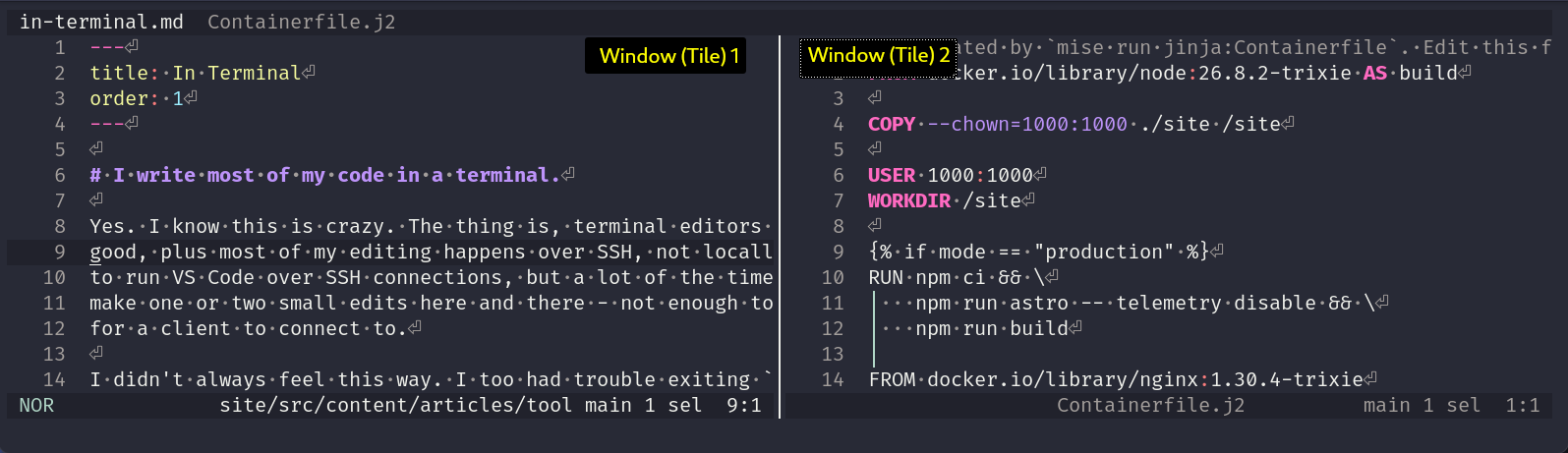
I can have more than one tab (buffer) open.

Or, I can split my terminal into tiles!
Search a whole project?
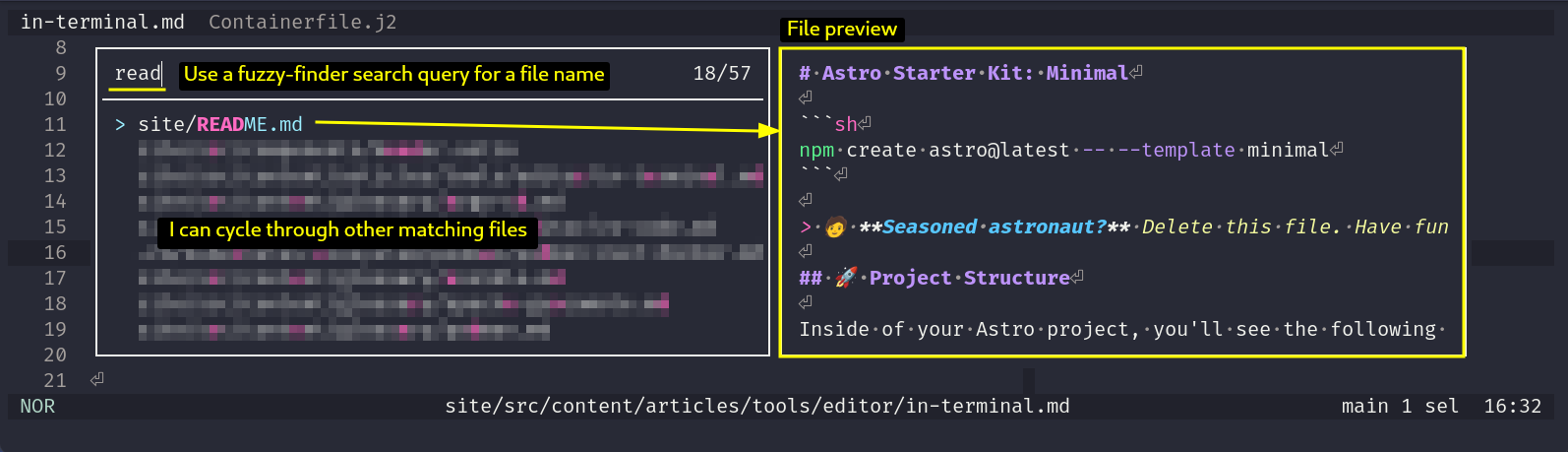
I can search for files by name
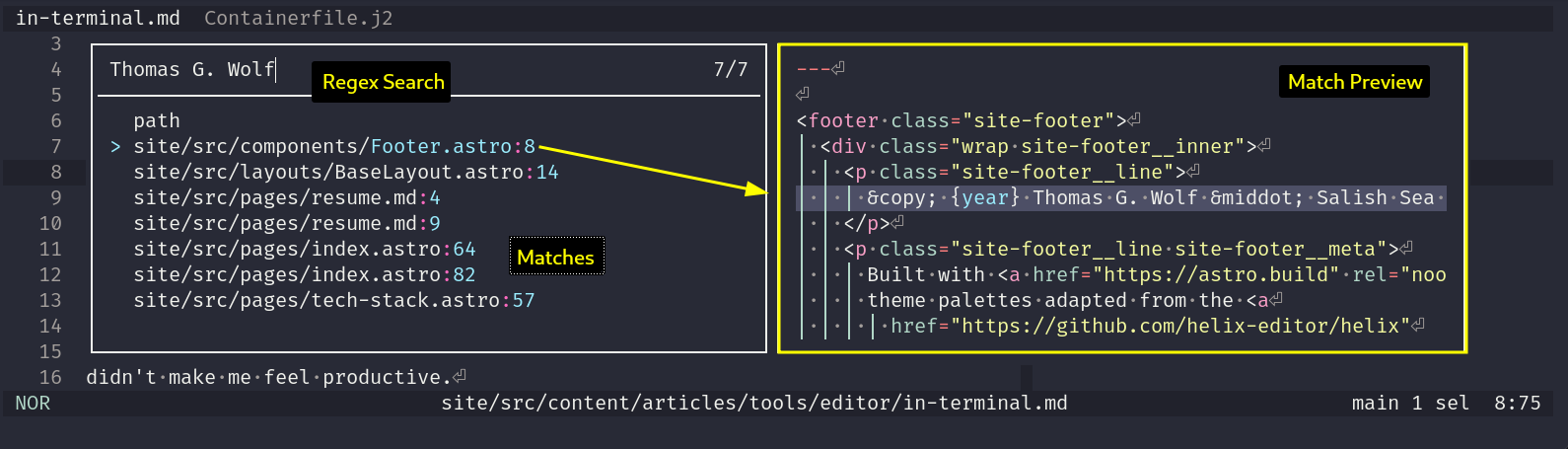
I can search file contents for a regex string
VS Code
But not always.
Helix covers almost everything I need, generally, out of the box. A few things still send me back to a GUI editor, and I’d rather admit that than pretend otherwise.
The biggest one is debugging. pdb++ covers Python well enough that it
barely counts as a gap for the terminal workflow. It doesn’t cover
everything else. When I’m chasing a bug in a language or runtime where the
debugger story is thinner, or the bug only really gives itself up with real
breakpoints, watch expressions, and stepping through a call stack visually,
VS Code’s debugger is just better tooling for that specific job. Pretending
otherwise would slow me down for no good reason.
The other one is other people. If I’m pairing with someone, or walking a client through a change over a screen share, asking them to also pick up subject-then-action modal editing first is a bad use of everyone’s time. VS Code is the thing almost anyone can already read, so that’s what goes on screen.
And sometimes it really is just the ecosystem: a language, framework, or notebook-style workflow where the good tooling happens to live in a VS Code extension and nowhere else yet.
None of that changes the default. Most editing still happens in Helix, over SSH, on whatever box the work actually lives on. VS Code comes out for the specific situations above, not because the terminal stopped being enough.
Runtime & tasks
to pin language and tool versions per project and to drive per-repo task runners and environment.
From GNU Make to mise-en-place
From Make to mise-en-place.
For years, Make was just what I reached for. It’s already installed
everywhere, make build / make test / make deploy targets are a
convention most people already know, and PHONY targets are good enough as
a task runner for most things.
What Make never did was touch tool versions. A Makefile could run
node build.js, but it had no opinion about which node. That lived
somewhere else entirely: nvm for Node, pyenv for Python, rbenv for Ruby,
each pinned by its own dotfile, in its own format, read by its own shell
hook. The Makefile and the version manager never actually talked to each
other. It worked, right up until it didn’t, a fresh clone with the wrong
global version quietly running the wrong thing before anyone noticed.
mise is what finally closed that gap, and the name is the whole pitch: mise en place, everything in its place before you start cooking. One file pins the tool versions a project needs and defines the tasks that build, run, and test it, so the two things Make and a version manager used to handle separately, and inconsistently, live in the same place and get read the same way.
This site is the plainest example: mise.toml pins Node, fnox, age, and
hadolint, and mise run build, mise run start, and mise run test:e2e
are the entire interface to building, running, and testing it. A fresh
checkout, on any machine, gets the right versions automatically instead of
“works on my machine.” Bigger infrastructure gets exactly the same
treatment, not a special case just because the project is larger.
I still respect Make for what it actually is. I just don’t reach for it as a task runner anymore, now that there’s a tool that also handles the half of the problem Make was never built to solve.
Mise Cookbook
Mise Cookbook
My baseline mise.toml starting point for each language, one snippet per
language below. Copy, drop into a fresh project, adjust the pinned version.
Python
My baseline for a python environment in mise-en-place
[tools]
# Statically define the python version.
python = "3.13"
# The language-server configured for Python in my Helix Editor config.
ruff = "latest"

[env]
# Where to create the python virtual environment
_.python.venv = {path = ".venv", create = true }

# Message of the Day for the project
# This hook runs when the project is entered. Changing directories within the
# project does not trigger it again.
[hooks.enter]
run = '''
cat << HEREDOC
##########################################################
 Welcome to {{ config_root | basename }}
##########################################################
 To get started, ...
HEREDOC
'''
Containers
, rootless and daemonless.
Rootless Podman over Rootfull Docker
Rootless, or it doesn’t run.
Docker’s daemon runs as a single, typically root owned, background process. Every container command goes through it, and anything that can reach that socket can effectively act as root on the host. I spent years accepting that as just how containers worked.
Podman doesn’t have a daemon at all. Containers run as regular child processes of whichever user started them, rootless by default, with no privileged service sitting there the whole time waiting to be the thing that gets compromised. On projects that also carry NIST 800-171 / CMMC 2.0 obligations, that’s not a nice to have, it’s one less thing to explain in an audit and one less way for a container escape to turn into a host compromise.
Switching didn’t cost much. Podman’s CLI is close enough to Docker’s that
most muscle memory and most existing scripts carried over directly. Where
it actually goes further is systemd integration through Quadlet: a
container becomes an ordinary systemd unit, managed with the same
systemctl and journalctl habits as everything else on the box, instead
of a separate runtime with its own lifecycle tooling bolted on the side.
It’s the same instinct behind treating a laptop the same way as a node in a cluster: fewer standing daemons, fewer special cases, fewer things running as root just because that used to be the default.
AI pair
and OpenCode for day-to-day engineering; purpose-built agent harnesses where a workflow needs one.
Secrets
as the source of truth, injected into environments at runtime (via fnox + age here) and never committed.
Shell & OS
bash and Linux everywhere, a laptop managed the same way as a node in a cluster.
Bash over Fish
Same shell, everywhere.
Fish is a genuinely nicer interactive shell out of the box. Autosuggestions, sane defaults, syntax highlighting without any configuration. I’ve used it, and I understand why people switch and don’t look back.
The problem is everywhere else. Every server I SSH into, every CI runner,
nearly every container base image, defaults to bash or plain sh, not
fish. Fish scripts aren’t POSIX compatible, so anything written for
interactive use in fish still has to be rewritten in bash (or sh) the
moment it needs to run unattended somewhere else: a cron job, a CI
pipeline, a Dockerfile RUN line. That’s a second shell dialect to
maintain for no real benefit.
Bash isn’t the nicer shell to type into. It’s the one that’s already there, whether I’m sitting at a laptop or SSHed into a node three time zones away, interactively and in a script, with nothing to translate between the two. That’s worth more to me than better tab completion.
Workflows
Infrastructure as code
for configuration, Terraform / OpenTofu for provisioning, Packer and cloud-init for images. If it is not in a repo, it is not real.
GitOps
reconciles cluster state from Git; CI/CD runs in Gitea Actions on a self-hosted forge.
Reproducible builds
Projects declare their toolchain and build in containers, so a checkout is enough to build and run. This site is a small example: one mise run start renders a Containerfile and serves the app.
Observability first
Grafana, Loki, and Prometheus (with Grafana Alloy) go in early, not after something breaks; Gatus and ntfy cover health and alerting. Umami to understand how visitors interact with my sites.
Compliance as a constraint
NIST 800-171 / CMMC 2.0 requirements shape the architecture from the start rather than being bolted on.
Tech stack
AI infrastructure
Agents, retrieval, and the tooling that wires them into real workflows.
AI agents
Claude Code
Anthropic's agentic coding tool, run from a terminal or IDE to read, edit, and operate on a real codebase.
Open full page →Retrieval & tooling
RAG pipelines
Retrieval-Augmented Generation — grounding an LLM's answers in retrieved documents instead of memory alone.
Open full page →MCP tool integration
Model Context Protocol — an open standard for connecting an AI agent to external tools, data, and systems.
Open full page →Execution & runtime
Application & solution architecture
How systems get designed and decomposed before anything is built.
Design & standards
Modernization
Application patterns
Languages
What I actually write code in, day to day.
Scripting & systems
Application & enterprise
Other
Cloud & platform
Where workloads run, from public cloud to a self-hosted Kubernetes cluster.
Public cloud
Virtualization & bare metal
Kubernetes ecosystem
Kubernetes
A container orchestration platform for deploying, scaling, and self-healing distributed workloads.
Open full page →K3s
A lightweight, single-binary Kubernetes distribution built for edge, IoT, and small-footprint clusters.
Open full page →Podman
A rootless, daemonless container engine, compatible with Docker CLI and images.
Open full page →Podman over Docker
Docker’s daemon runs as a persistent, typically root-owned background process — anything that can reach it can effectively act as root on the host. Podman is rootless and daemonless by default: containers run as regular child processes under the invoking user, with no standing privileged service to compromise. On systems that also carry NIST 800-171 / CMMC 2.0 obligations, that’s not a nice-to-have, it’s one less thing to justify in an audit.
The switch is low-friction because Podman’s CLI is close to a drop-in
replacement for Docker’s — most muscle memory and most existing scripts
carry over directly. Where it goes further is systemd integration
(Quadlet): a container can be defined as an ordinary systemd unit and
managed with the same systemctl/journalctl habits used for everything
else on the box, rather than a separate container runtime with its own
lifecycle tooling bolted on the side.
That’s the same principle behind treating a laptop the same way as a node in a cluster: fewer special cases, fewer standing daemons, fewer things that behave differently depending on which machine they’re running on.
Network & access
Apache Guacamole
A clientless remote desktop gateway — RDP, VNC, and SSH access through nothing but a browser.
Open full page →Automation & IaC
Configuration, provisioning, and delivery, all declared in a repo.
Configuration & testing
Ansible
An agentless configuration-management and automation tool driven by declarative YAML playbooks.
Open full page →Provisioning
Delivery & tasks
mise
A tool version manager and task runner that pins languages, tools, and tasks per project.
Open full page →Argo CD
A declarative GitOps continuous-delivery tool for Kubernetes — the cluster's actual state is reconciled from Git.
Open full page →QA
Playwright
A browser automation framework for end-to-end testing across Chromium, Firefox, and WebKit.
Open full page →Observability
Metrics, logs, dashboards, and alerting, wired in from day one.
Metrics
Logs
Dashboards & alerting
Identity, endpoint & PKI
Directory, SSO, and certificates for every identity in the environment.
Directory & endpoint
SSO & secrets
1Password
A password manager used here as the source of truth for secrets, injected into environments rather than committed.
Open full page →PKI & certificates
Data & storage
Where state lives and how it's queried.
Databases
Storage & forge
Workflow/data tooling
Security & compliance
Frameworks and hardening that shape the architecture, not bolt onto it.
Compliance frameworks
Hardening
Network defense
Delivery & collaboration
How work gets tracked and communicated.